How to Play My Timber Pets
Chop, upgrade, roll, expand — then leave the animals working.
My Timber Pets plays like a compact Roblox idle tycoon. You do not quest across biomes. You run a lumber island: assign animals, collect logs, spend those logs on three sinks, and let the plot keep running while you AFK. This page is the full loop. If you have not finished onboarding, start with Getting Started instead.
The official description lists five pillars: idle earnings, forest upgrades, free unlimited rolls, new floors, and crew upgrades. Every menu in the HUD maps to one of those five. If a button does not raise logs per second, extra plots, or roll quality, it is cosmetics or a Robux shop. Ignore it until the island is staffed.
The chop loop
Animals walk to trees, chop, and produce logs. Promotional art labels income as logs per second (1/s on a starter cube tree, 45Q/s on a late mushroom island). Your job is to keep that number rising without creating empty plots.
- Assign. An animal in a collection menu is idle. Drag or equip it onto a tree or a marked pad.
- Chop. The animal does the work. You may still tap a tree during the tutorial, but the design is idle: you should not need to click every log.
- Carry / stack. Official shots show log piles on the grass and later on purple floors. If a carry cap exists, animals stop when they are full. That is a crew upgrade problem, not a forest problem.
- Spend. Open upgrades and dump logs into the next bottleneck. Do not sit at a cap.
- AFK. Leave the session or the client with animals still assigned. Details: how to farm AFK.
If the per-second counter is zero, you are looking at an unstaffed island. Fix assignment before you buy anything else.
The three log sinks
Logs only matter if they become a better island. Rank the sinks like this unless a quest forces a click:
1. Forest (trees)
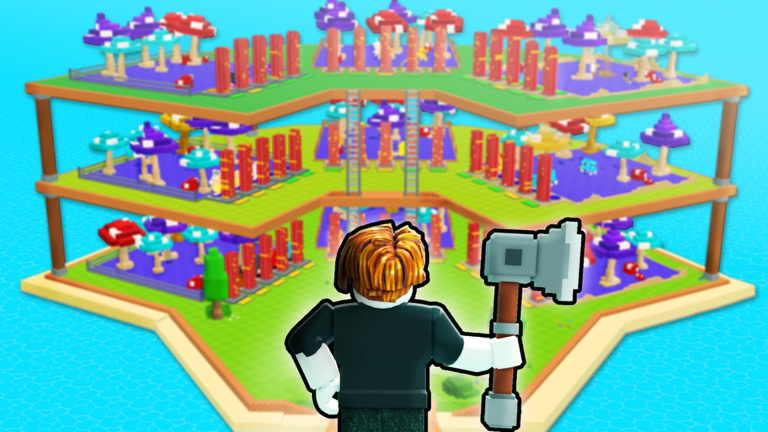
Better trees raise the value of every chop. Starter art uses a green cube. Later art uses tall mushroom trees in purple, red, and cyan on a purple platform. That visual jump is the forest track. Read upgrade your forest before you stack floors you cannot plant.
2. Crew (animals and their stats)
Crew upgrades make the same tree pay faster: chop speed, carry size, maybe luck on rolls. Rolling a new animal is also a crew action. Compare pulls with the animal tier list and best crew. A kitsune-style fox with a 1/67Qn label is a trophy; a dinosaur-style unit next to 45Q/s is an earner. Keep the earner.
3. Floors (space)
Official overview art shows three hexagonal stories with ladders, mushroom trees, and red log stacks. Floors are extra plots. They are worthless until you have animals and trees for them. Unlock floors when the ground story is full, not when you want a screenshot.
The upgrades tier list is the short version of this ranking.
Rolling without wrecking the loop
The game advertises free unlimited rolls. That is a retention hook, not a command to stand at the red button. Official thumbnails show a mystery silhouette on a pedestal, a white-gloved hand hitting a red stud, then a red-and-white fox. Another shot shows a giant red log at 1/6.7Qn. Those numbers are marketing for chase rares. Most rolls will be commons.
Rules of thumb:
- Roll in short bursts between upgrades, not as your only activity.
- After each interesting pull, check whether it beats your worst assigned animal. If it does not, keep chopping.
- Do not delete a staffed chicken until a replacement is assigned. Empty trees earn
0/s. - Traits exist: the game icon is a blue snake with a TRAIT banner. If a pull has a trait tooltip, read it before you lock the slot. More on that in rare animals and the animal index.
HUD and menus
Expect some mix of:
- Currency (logs) in a corner.
- An upgrade shop split into forest / floors / crew.
- A collection or index of animals.
- A roll or luck button.
- A codes, gift, or shop icon (see how to redeem codes).
- Settings / music / rejoin.
Tap every icon once on your first session so you know which one is cosmetics. Rebind nothing; default Roblox WASD plus click is enough.
Session structure that actually works
A good 20-minute session looks like this:
- Rejoin, confirm animals are still assigned.
- Spend any AFK logs sitting at a cap.
- Buy one forest or crew upgrade, not five random ones.
- Do a small roll burst only if you have a weak slot.
- Leave the island in a staffed state.
A bad session is ten minutes of rolling, one unstaffed floor purchase, and a disconnect. The progress checklist is a one-page version of the good session.
Multiplayer and trading
Servers hold six players. You will see other avatars and other islands. That does not mean a trading economy is the point of the game. Until WingBrain documents a safe trade window, do not hand a rare fox to a stranger. Leaderboards, if present, are for bragging, not for giving away your only dinosaur-style earner.
Voice chat is listed as not supported on the Roblox page. You will not be calling plays with a crew. This is a parallel idle session, not a raid.
When you feel stuck
- Rate is flat: buy a better tree or a chop-speed crew upgrade.
- Animals idle: carry cap or no tree assigned.
- Island looks empty on a new floor: you bought space too early.
- You want a code: check the codes hub. None were public on 1 Sep 2026.
- You want automation: read scripts and script safety first. No dedicated script was listed for this title on that date.
Play the loop until AFK time feels automatic. Then the rest of the wiki is just finer control over the same three sinks.
Frequently Asked Questions
Quick answers for My Timber Pets on Roblox.
What is the main goal in My Timber Pets?
Raise logs per second by staffing trees, upgrading the forest, expanding floors, and keeping a stronger crew. See AFK farm once that loop is stable.
Should I upgrade floors or trees first?
Trees and crew first. Floors add empty plots. The upgrades tier list and unlock floors pages explain the timing.
Are rolls really unlimited?
The official description says free unlimited rolls. Treat that as a gacha tap, not a reason to ignore chopping. Rare animals covers keep rules.
Can I play with friends?
Servers hold six players. You share a server, not a single co-op plot. Invite friends to the official place if you want company, not shared upgrades.